
The panel that keeps your sites safe.
Self-hosted nginx panel for Debian 12 & 13, designed for small VPS, Raspberry Pi 4/5, and Proxmox homelabs. Per-site outbound firewall, WireGuard admin plane, Squid SNI filter — all from one panel, all with files you can read.
Free for personal and non-commercial use — home labs, learning, self-hosting your own things. Commercial deployments (paying clients, for-profit production) require a NetForge license — see the terms. Anonymous Brave-style telemetry, opt-out documented.
Why arx
Secure by default
Strict site isolation (mode 0750 / 0640 owner:owner), per-site UID firewall, default-deny outbound. No "just enable everything and we'll figure it out". Every layer is opt-in and auditable.
Not a black box
Every nginx and FPM config arx generates lives in
/srv/arx/ and is yours to read. Drift detection
warns when you edit by hand and offers
"accept your edit as the new baseline" — never silently
overwrites. CLI parallels every UI action.
Pi & homelab first-class
No Docker. RAM-aware: optional features show estimated RAM
cost before you flip the toggle. Ships as a self-contained
.deb for Debian 12 & 13. Proxmox LXC template
on the way.
How a request flows through arx
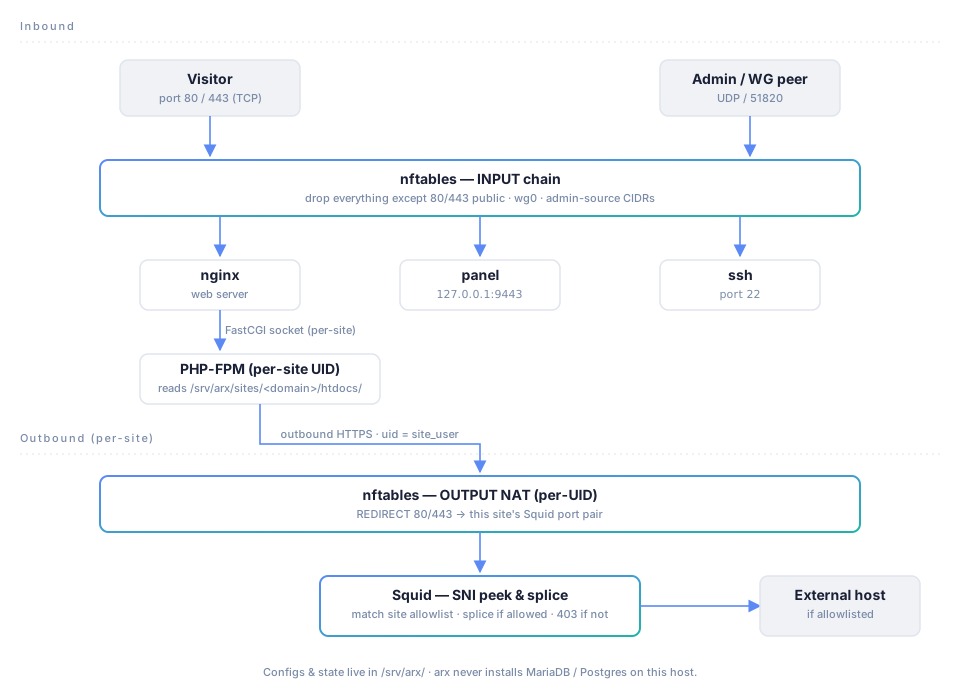
Every visitor hit and every outbound call from a site go through the same pipeline. Two lanes — inbound (visitor / admin) and outbound (the site reaching the world). Each blue-bordered box is a security checkpoint you control.
The chosen stack
One right answer per category. Less choice, less to configure, less to break — and less drift between two arx boxes.
Databases live on another host. arx never installs MariaDB or Postgres on the web box — your blast radius shouldn't be one ssh away.
Defense in depth, layer by layer
nftables — per-UID outbound + admin-source ingress
Each site user gets a dedicated chain that default-rejects unless a destination IP/CIDR is whitelisted. Inbound: only 80/443 public, SSH/panel reachable from WireGuard or admin-source CIDRs you set. Default-OFF master switch prevents you from locking yourself out on the first apply.
WireGuard — admin plane
SSH and the panel itself only accept connections from tunnel peers. Public scan of your VPS sees web ports + UDP/51820 + nothing else. Peer keys are generated server-side with X25519, the client config is shown once and never stored.
Squid — transparent SNI filter
When enabled, nftables redirects every site's outbound 80/443 to a per-site Squid port. Squid peeks the TLS ClientHello, splices through if the destination is on the site's allowlist, refuses otherwise. No MitM: certs are never terminated, so even apps that pin certs keep working.